
Participant-paid assignments
If the course is Participant-paid, Participants complete the following enrollment process:
- Log in to Breakout Learning.
- If accessing Breakout Learning through an LMS, open the assignment directly through Canvas or D2L Brightspace instead of logging in to Breakout Learning separately.
- Participants will only be prompted to pay or enter an access code once the assignment is open and available to begin.
- Click Enroll.
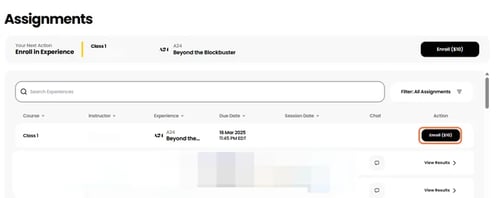
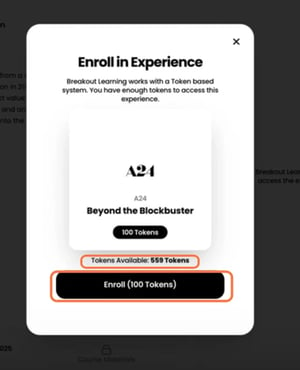
- If payment is required, click Pay with Stripe.
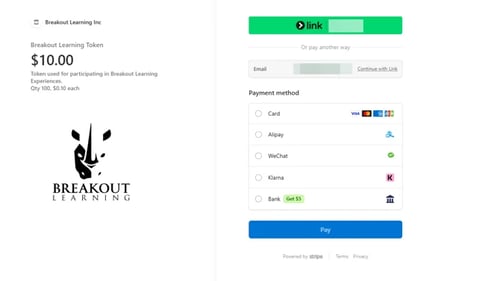
- Complete the Stripe checkout.
- Once enrolled, the Participant can join a group, access the pre-work, and complete the assignment.
Some institutions require Participants to purchase access through their campus bookstore instead of paying directly through Breakout Learning. In these cases, Participants may receive an access code that can be entered during enrollment to activate access. Depending on the institution's bookstore integration, access may also be activated automatically without displaying the Enroll button.
Institution-paid assignments
If the course is institution-paid, Participants are enrolled automatically and no individual payment is required.
If Participants have questions about payment or access, they should contact support@breakoutlearning.com.
Do you want students to purchase multiple assignments at once? Would you like to request a section to be invoiced to your institution? Do you have a promotion you’d like to redeem?
For any of the above, please contact support@breakoutlearning.com.